Motor Driver Guide
Our robot uses the XDrive MINI motor driver board from Makerbase (MKS) in place of the motor controller used by the original Berkeley Humanoid Lite. The XDrive MINI is based on ODrive v3.6 and has an on-board AS5047P encoder.
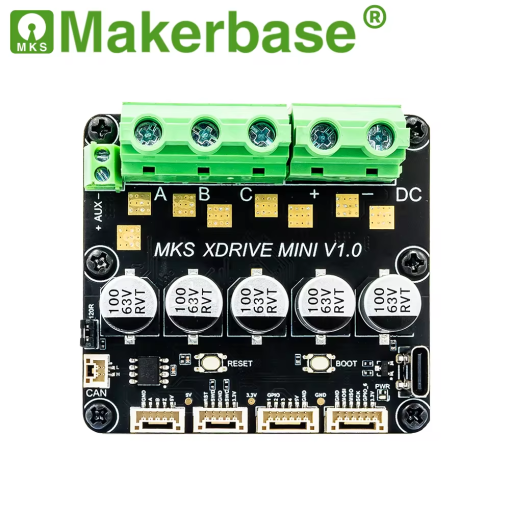
XDrive MINI (image: Makerbase)
Changing the driver board also changed some actuator parts. See What’s different from Berkeley Humanoid Lite on the actuator assembly page.
Official documentation and resources
- ODrive documentation (v0.5.6): Getting Started: the official ODrive documentation for the ODrive v3.6 generation, which the XDrive MINI is based on.
- MKS ODrive video playlist (YouTube): Makerbase’s official tutorial videos for their ODrive-based boards, covering the important setup steps.
- MKS ODrive GitHub repository: Makerbase’s repository with the original firmware. The XDrive MINI firmware is in the
Firmware/MKS ODrive_Sfolder.
Community project: MKS-XDRIVE-MINI
A community member has made a guide project for the XDrive MINI, with configuration instructions using the ODrive tool, firmware files, and troubleshooting tips, for example for running several drivers on one CAN bus. It’s a great place to start trying out and playing with the motor driver.
We recommend using this project to get comfortable with the motor driver before building the full robot. Practice:
- using
odrivetool- flashing firmware
- setting up the motor driver configuration
- running CAN communication
Course firmware (recommended)
For the project, we recommend using our modified firmware for the XDrive MINI:
xdrive-mini-fw-instant-start (GitHub)
It is a modified version of the MKS ODrive v0.5.1 firmware. The XDrive MINI’s on-board AS5047P is an absolute encoder, but the stock firmware still runs the encoder offset calibration again at every power-on. We modified the firmware so that the driver:
- skips the encoder offset calibration at power-on, after a one-time calibration
- starts from any rotor position and goes straight into closed-loop control, without jumping
To use it:
- Download the
.hexor.elffile from the repository’s Releases page. - Flash it to the XDrive MINI (see Flashing firmware below).
- Configure the driver with the ODrive tool using
xdrive_config.txtfrom the repository, which includes the one-time calibration.
See the repository’s README for the details of what was changed and how to configure the driver.
Flashing firmware
If your firmware is a .bin, .hex, or .elf file, we recommend STM32CubeProgrammer from STMicroelectronics to flash it quickly.
To flash the firmware, you’ll need an ST-Link V2 programmer, connected to the driver board’s SWD pins.